Showing posts with label C#. Show all posts

Print Crystal Report from own button in asp.net c#


C# code to print crystal report in asp.net from print button

using System; 
using System.Collections.Generic; 
using System.Linq; 
using System.Web; 
using System.Web.UI; 
using System.Web.UI.WebControls; 
using System.Data; 
using SoftHMS.GUI.MISC; 
using SoftHMS.Layer.Business; 

namespace SoftHMS.GUI.Pharmacy.PharmacyReports 
{ 
public partial class breakageReport : System.Web.UI.Page 
{ 
DataSet ds = new DataSet(); 
CrystalDecisions.CrystalReports.Engine.ReportDocument doc = new CrystalDecisions.CrystalReports.Engine.ReportDocument();

protected void Page_Load(object sender, EventArgs e) 
{ 
DateTime TodayDate = DateTime.Now; 
string todaydate = SoftHMS.GUI.NepDate.getNepaliDate(TodayDate).Replace("/", "-"); 
if (!Page.IsPostBack) 
{ 
txtFromDate.Text = todaydate; 
txtTodate.Text = todaydate; 
} 
if (Request.QueryString["act"] == "Print") 
{ 
BreakageBLL obj = new BreakageBLL(); 
string doclocation = Server.MapPath("~/Pharmacy/cryBreakage.rpt"); 
doc.Load(doclocation); 
string fromDate = Request.QueryString["fromdate"].ToString(); 
string toDate = Request.QueryString["todate"].ToString(); 
//obj.FromDate = Convert.ToDateTime(fromDate); 
// obj.ToDate = Convert.ToDateTime(toDate); 
ds = obj.GetBreakageDetailsforReport(); 
doc.SetDataSource(obj.GetBreakageDetailsforReport()); 
BreakageReportViewer.ReportSource = doc; 
doc.SetParameterValue("nepdate", todaydate); 
doc.SetParameterValue("fdate", fromDate); 
doc.SetParameterValue("tdate", toDate); 
BreakageReportViewer.DataBind(); 
} 
} 

protected void Button1_Click(object sender, EventArgs e) 
{ 
string fromDate = txtFromDate.Text; 
string toDate = txtTodate.Text; 
//Response.Redirect("breakageReport.aspx?act=print&fromdate=" +fromDate+ "&todate="+ toDate+""); 
Response.Redirect("breakageReport.aspx?act=Print&fromdate=" +fromDate + "&todate=" + toDate + ""); 
} 
//Print Button
protected void btnPrint_Click(object sender, EventArgs e) 
{ 
try 
{ 
if (ds.Tables.Count < 1) 
{ 
ClientScript.RegisterStartupScript(this.GetType(), "alert", "alert('Report is not generated. Please generate report first to print.')", true); 
// doc.PrintToPrinter(1, true, 0, 0); 
} 

else 
{ 
//Print Code
doc.PrintToPrinter(1, true, 0, 0); 
//ClientScript.RegisterStartupScript(this.GetType(), "alert", "alert('Report is not generated. Please generate report first to print.')", true); 
}
} 
catch (Exception ex) 
{ }
} 
} 
}

How to show alert box in ASP.NET after data inserted successfully using C#


Write this line after your insert code:

ClientScript.RegisterStartupScript(this.GetType(), "alert", "alert('Data has been inserted successfully.')", true);

Alternate Row Color in Crystal Report


Most of the time while developing reports people wonder how to have alternating row colours in the report like below.

Customer Name Address City State Zip
Suparba panda 123 olive rd St Louis MO  54678
John Doe 456 Tree drive Raleigh NC 14676
Jane Doe 768 Hudson rd Atlanta GA 76555

There is a trick to it.

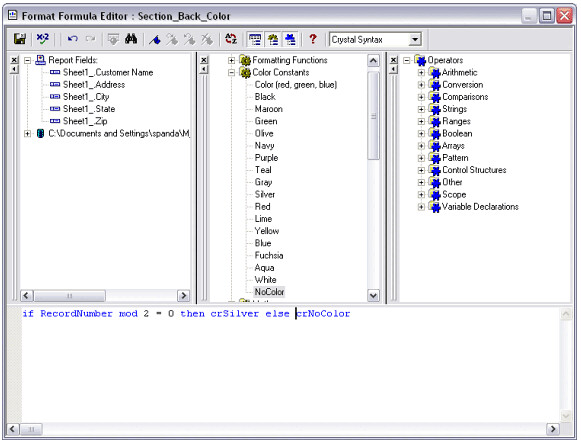
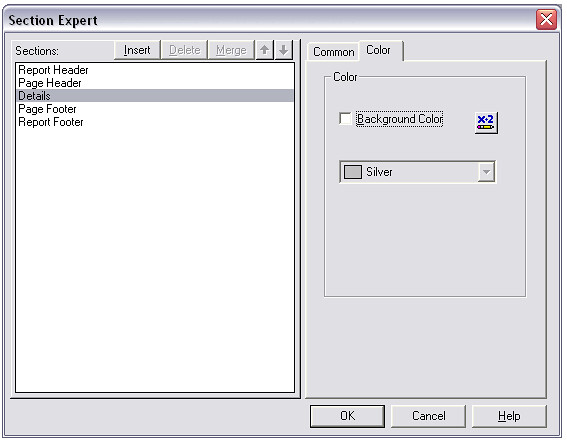
Go to the format section of the Details. Click the Colour Tab. Then click the button next to the Background Colour Check-box..
CR1

In the formula editor of background colour, type the following:
if RecordNumber mod 2 = 0 then crSilver else crNoColor

CR2

Save and close the editor.
And now when you run the report you will see alternate colours of silver and white in the details section.

C# SQL Server Connection


You can connect your C# application to data in a SQL Server database using the .NET Framework Data Provider for SQL Server. The first step in a C# application is to create an instance of the Server object and to establish its connection to an instance of Microsoft SQL Server.
The SqlConnection Object is Handling the part of physical communication between the C# application and the SQL Server Database . An instance of the SqlConnection class in C# is supported the Data Provider for SQL Server Database. The SqlConnection instance takes Connection String as argument and pass the value to the Constructor statement.

Sql Server connection string
connetionString="Data Source=ServerName;
Initial Catalog=DatabaseName;User ID=UserName;Password=Password"

If you have a named instance of SQL Server, you'll need to add that as well.
 "Server=localhost\sqlexpress"

When the connection is established , SQL Commands will execute with the help of the Connection Object and retrieve or manipulate the data in the database. Once the Database activities is over , Connection should be closed and release the Data Source resources .

cnn.Close();

The Close() method in SqlConnection Class is used to close the Database Connection. The Close method rolls back any pending transactions and releases the Connection from the SQL Server Database.
A Sample C# Program that connect SQL Server using connection string.

using System;
using System.Windows.Forms;
using System.Data.SqlClient;
namespace WindowsApplication1
{
    public partial class Form1 : Form
    {
        public Form1()
        {
            InitializeComponent();
        }
        private void button1_Click(object sender, EventArgs e)
        {
            string connetionString = null;
            SqlConnection cnn ;
   connetionString = "Data Source=ServerName;Initial Catalog=DatabaseName;User ID=UserName;Password=Password"
            cnn = new SqlConnection(connetionString);
            try
            {
                cnn.Open();
                MessageBox.Show ("Connection Open ! ");
                cnn.Close();
            }
            catch (Exception ex)
            {
                MessageBox.Show("Can not open connection ! ");
            }
        }
    }
}
Connect via an IP address
connetionString="Data Source=IP_ADDRESS,PORT;
Network Library=DBMSSOCN;Initial Catalog=DatabaseName;
User ID=UserName;Password=Password"

1433 is the default port for SQL Server.

Trusted Connection from a CE device
connetionString="Data Source=ServerName;
Initial Catalog=DatabaseName;Integrated Security=SSPI;
User ID=myDomain\UserName;Password=Password;

This will only work on a CE device

Connecting to SQL Server using windows authentication
"Server= localhost; Database= employeedetails;
Integrated Security=SSPI;"

A sample c# program that demonstrate how to execute sql statement and read data from SQL server.

using System;
using System.Windows.Forms;
using System.Data.SqlClient;
namespace WindowsApplication1
{
    public partial class Form1 : Form
    {
        public Form1()
        {
            InitializeComponent();
        }
        private void button1_Click(object sender, EventArgs e)
        {
            string connetionString = null;
            SqlConnection connection  ;
            SqlCommand command ;
            string sql = null;
            SqlDataReader dataReader ;
            connetionString = "Data Source=ServerName;Initial Catalog=DatabaseName;User ID=UserName;Password=Password";
            sql = "Your SQL Statement Here , like Select * from product";
            connection = new SqlConnection(connetionString);
            try
            {
                connection.Open();
                command = new SqlCommand(sql, connection);
                dataReader = command.ExecuteReader();
                while (dataReader.Read())
                {
                    MessageBox.Show(dataReader.GetValue(0) + " - " + dataReader.GetValue(1) + " - " + dataReader.GetValue(2));
                }
                dataReader.Close();
                command.Dispose();
                connection.Close();
            }
            catch (Exception ex)
            {
                MessageBox.Show("Can not open connection ! ");
            }
        }
    }


}